david dominguez 😺
Homelab - n8n
Mar 10, 2026What I needed
The origin of the n8n portion of my homelab was to practice using the platform for work. There was news of an upcoming project for me, which was n8n development and consultation, beginning in the next few weeks. Therefore, I began to stand it up immediately so I could understand how the intricacies of it work, as well as familiarize myself with using it enough so that I could speak on it enough and explore potential solutions for the client.
My use case ended up being to use it on top of another existing automation. I had setup an existing automation that runs on a daily basis, and I was finding that, at times, it didn’t work, and it wasn’t practical to check on the log file each day.
So this workflow I decided to create in n8n was solely meant to monitor the output of the pre-existing automation, and send me a notification on a daily basis via Discord. The following were the three conditions I designed:
- The workflow was successful and new items were downloaded, thus it would return the human-readable names of the downloaded items
- The workflow was successful but no new items were downloaded, thus it would return “Everything is all good”
- The workflow was unsuccessful, thus it would return the exact error message, its interpretation on what the error could be, and identify potential solutions for the error message
What is n8n
n8n is a fair code solution/platform that is available for folks to build low code automations. I’ve had the pleasure of experimenting with this solution not only at home, but in an enterprise environment as well. If you would like to skip the explanation of what I personally use n8n for then feel free to scroll down below for the general problem statement.
How it Works
Low code development platforms (like n8n) usually consists of reusable, preset blocks of code, which are typically known as ‘steps’. The idea is that, rather than creating a full automation from scratch, (e.g. Python script, Powershell, etc.) a combination of these steps will end up performing the full automation.
These steps in n8n allow for connections with different services, like Google Calendar, Anthropic, and so on, but also provide typical code logic (e.g. switch cases, if else’s, etc.).
n8n is not the only platform that offers low code automation, there are plenty of other services such as Tines, Swimlane, and Azure Logic Apps, just to name a few. They all have their own integrations with different services, and their own way of doing things, but generally the concept of these steps, is the same.
Why n8n (and low code development platforms) is used
Low code development platforms are meant to accelerate developers by providing these reusable code blocks and integrations out of the box, making it easier for developers to develop, faster. It also opens the ability to those that do not have raw programming language experience (e.g. Python, Powershell, etc.).
I’ve commonly used low code development platforms within my job, as typically large enterprise SOAR platforms are also low code development platforms (e.g. Azure Logic Apps, Power Automate, n8n, Swimllane, to name a few), which require their own engineers and automations, and has usually been where I (and others in my team) step in to provide support.
There’s a GUI!
Yes, n8n has a GUI. Here’s a screenshot below of how my specific workflow (workflow = the full automation, the full set of steps) is set up.
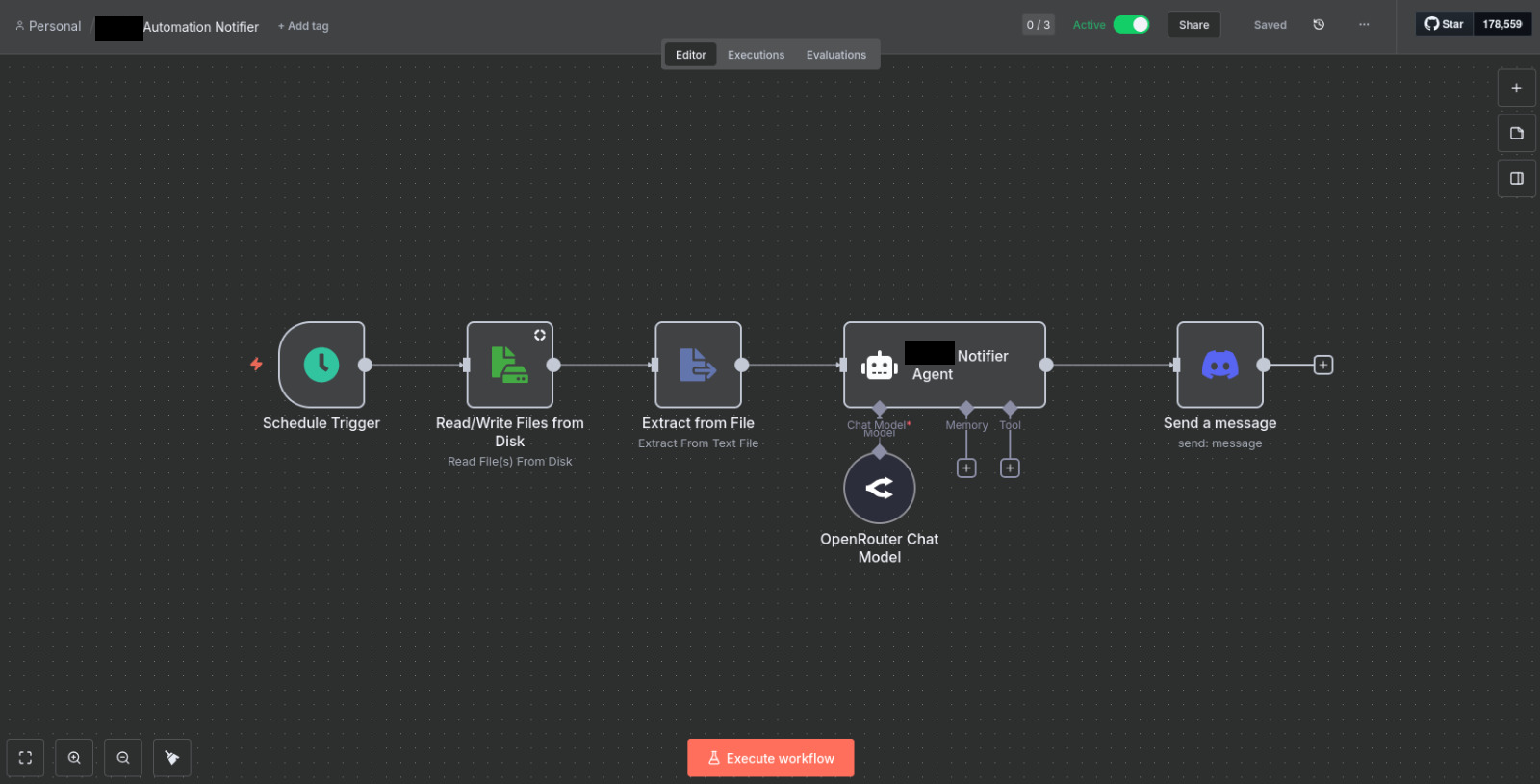
Each step may have specific parameters that could be based on prior steps, pre-set, or none at all. It highly depends on what you are trying to do. In this case, the main nodes I want to draw attention to are the ‘Extract from File’ node and ‘Notifier Agent’ node.
- The ‘Extract from File’ node reads the log file based on the mounted section I have allowed n8n to access. Getting that step ready was a pain in itself and may deserve a post one day.
- The ‘Notifier Agent’ node calls out to OpenRouter (for those that are unfamiliar, OpenRouter gives you access to all commercial AI models, rather than managing multiple provider API keys) with the specific model, system instructions, and prompt. The output of this is sent via Discord so I can check on the response from my phone.
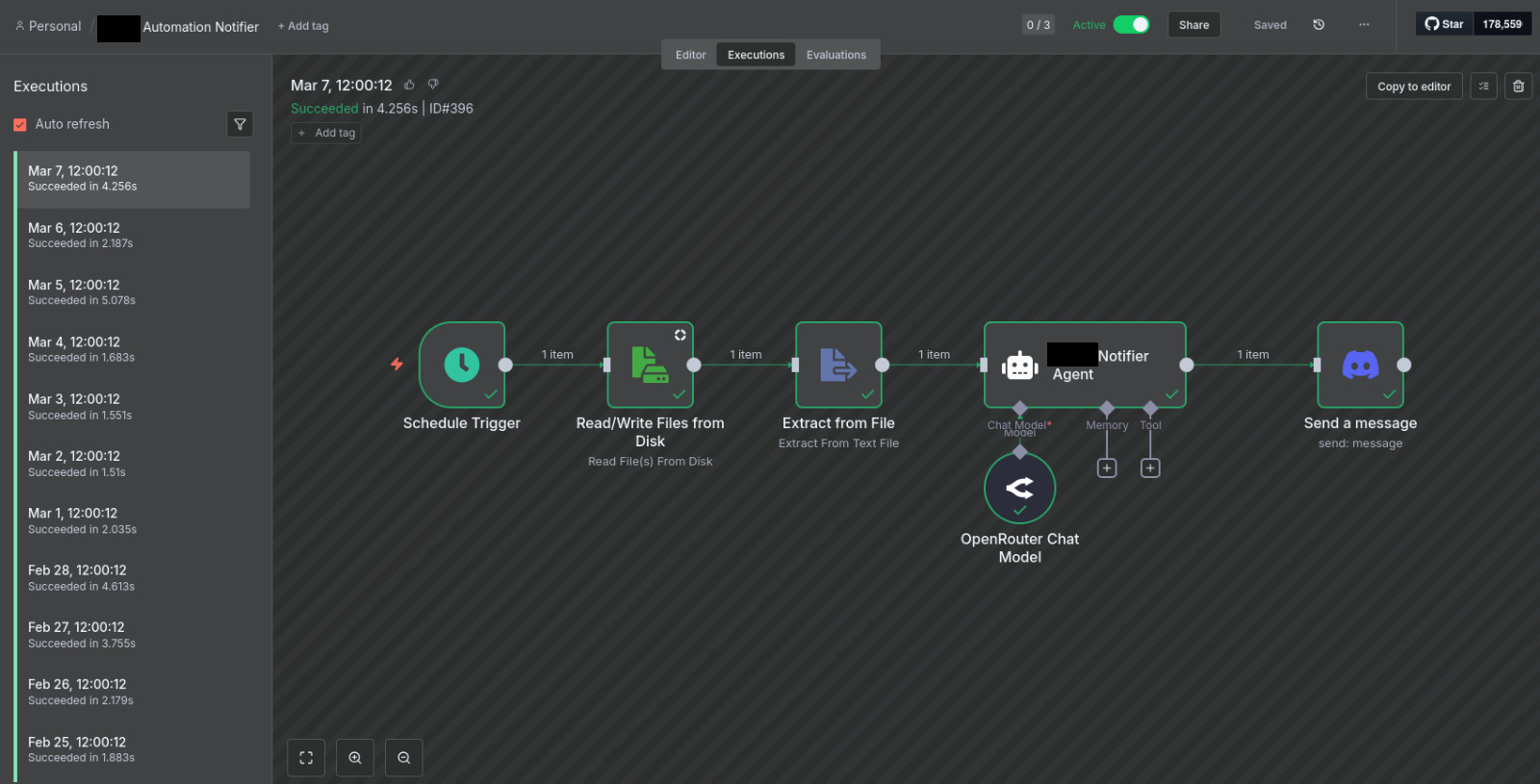
Above is a screenshot of the daily execution I have running at noon each day.
How can you use it?
n8n is available here to try out. I personally have it containzerized on my ROG Ally (comical, I know) but I have plans to move it to another system soon.
What n8n is NOT
- n8n is not something like a Cursor or a Loveable, there is no prompting mechanism for their steps in this fashion.
- n8n is not an IDE