david dominguez 😺
Homelab - Syncthing
Mar 03, 2026What I needed
So, Obsidian has this great notebook solution and I use it for many things including day-to-day notes, mine especially holds a lot of my old study notes, as well as many of these posts (they originally were meant as internal notepad/sketchpad types of notes, but some have now evolved outward).
Anyways, to use Obsidian, I found out two things quickly:
- It was great, and everything I wanted out of a notebook, and more. I’m a light user compared to many people, and I fully admit I don’t use it to its fullest capabilities.
- I did not want to add another subscription onto the never-endless pile of subscriptions just to be able to sync it across devices.
I checked the directory structure of Obsidian, just to check out what the actual content was behind it, how it was being read, etc., and quickly discovered it’s just a bunch of markdown. So I quickly thought to myself “well, my notebook will not be big enough for me to ever notice the size, so I might as well take advantage and just manage the syncing myself across devices”.
Lo and behold, this was how I discovered Syncthing.
What is Syncthing
Syncthing is what I use to synchronize my files between my laptop (my thonkpad), my gaming computer(s), and my off-site server.
It allows me to focus on modifying the files in their respective areas (i.e. music, notes, ebooks), without the need to worry about actually transferring the information back and forth, or leaving it up to another provider to charge me more.
How it Works
Below is a very high level ASCII representation of how it works, with the process showing an update in my notes as an example in this case. I won’t get into the weeds of how it works at a network level on this post, but feel free to send me a message if you want more info and we can dive in detail, together.
┌─────────────────────────────────────────────────────────────────────────┐
│                        SYNCTHING MESH NETWORK                           │
│                                                                         │
│   [thonkpad]            [off-site server]         [gaming computers]    │
│  ┌──────────┐           ┌──────────────┐          ┌──────────────────┐  │
│  │ 📁 music │           │ 📁 music     │          │ 📁 music         │  │
│  │ 📝 notes │◄─────────►│ 📝 notes     │◄────────►│ 📝 notes         │  │
│  │ 📚 ebook │           │ 📚 ebooks    │          │ 📚 ebooks        │  │
│  └──────────┘           └──────────────┘          └──────────────────┘  │
│                                                                         │
└─────────────────────────────────────────────────────────────────────────┘

━━━━━━━━━━━━━━━━━━━━━━━━━━━━━━━━━━━━━━━━━━━━━━━━━━━━━━━━━━━━━━━━━━━━━━━━

  STEP 1 — I edit a note on thonkpad
  ──────────────────────────────────────

  [thonkpad]
  ┌──────────────────────────┐
  │ 📝 notes/                │
  │   note-2026.md           │  ← file modified
  │                          │
  │  Syncthing detects       │
  │  change via              │
  │  filesystem watcher      │
  └──────────────────────────┘


  STEP 2 — thonkpad announces the change
  ────────────────────────────────────────

  [thonkpad] ── "I have a newer version of notes/note-2026.md" ────►  peers


  STEP 3 — Peers pull the updated blocks
  ────────────────────────────────────────

                               ┌───────────────────────┐
              ┌────────────────┤   [off-site server]   │
              │   requesting   │   📝 notes/ (syncing) │
              │   file blocks  └───────────────────────┘
              │
  [thonkpad] ◄┤
              │
              │   requesting   ┌───────────────────────┐
              └────────────────┤  [gaming computers]   │
                  file blocks  │   📝 notes/ (syncing) │
                               └───────────────────────┘

       Only the *changed blocks* of the file are transferred,
       not the entire file.


  STEP 4 — Sync complete
  ──────────────────────────

  [thonkpad]            [off-site server]       [gaming computers]
  ┌──────────┐          ┌──────────────┐        ┌──────────────────┐
  │ 📝 notes │          │ 📝 notes     │        │ 📝 notes         │
  │  ✅ up   │          │  ✅ up       │        │  ✅ up           │
  │  to date │          │  to date     │        │  to date         │
  └──────────┘          └──────────────┘        └──────────────────┘

       music and ebooks remain untouched as only notes were changed.

━━━━━━━━━━━━━━━━━━━━━━━━━━━━━━━━━━━━━━━━━━━━━━━━━━━━━━━━━━━━━━━━━━━━━━━━
There’s a GUI!
Luckily, managing this is pretty straightforward, as there is a GUI. I’ve attached a screenshot below as the example from my thonkpad.
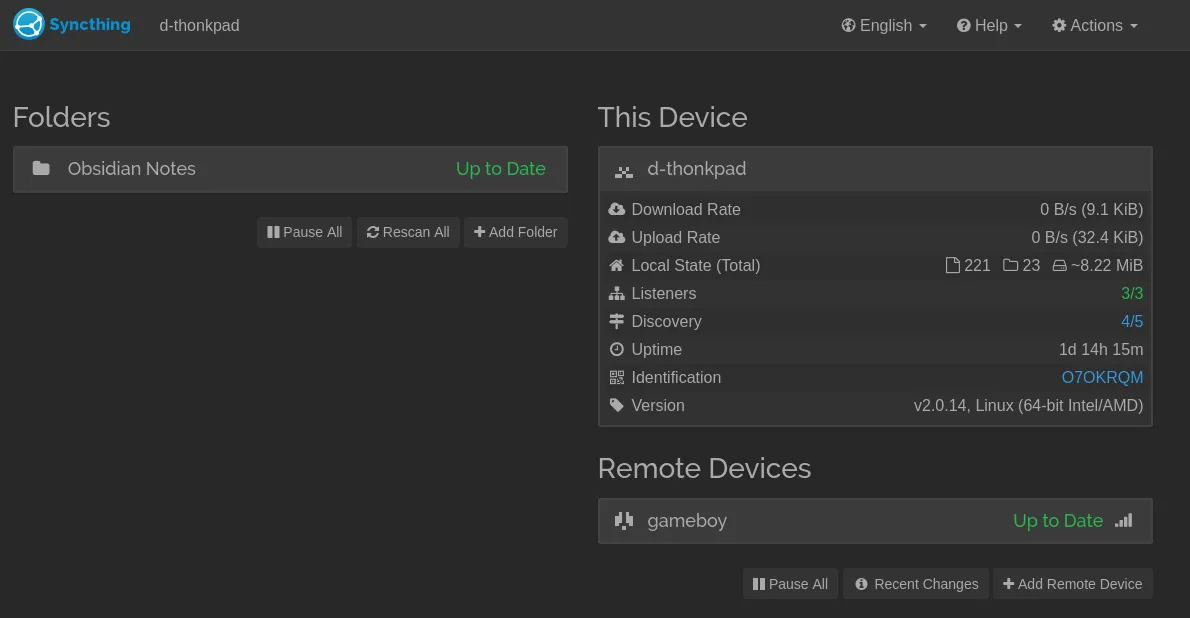
The key areas you’ll want to take a note of if you’re trying it yourself:
- Folders: Basically, ‘what do you want to sync?’. This screenshot only shows my notes, but on my other machines I have music and my ebooks. Not all folders need to be shared with all connected devices.
- Remote Devices: These are the devices your current device is connected to. One of my gaming computers is called ‘gameboy’, so anywhere you’ve established a connection, is here. Devices will automatically get added to this list as you sync across more devices.
- Identification: The ID shown on the screenshot here is just a shorthand form of my longer ID; but basically this is how the devices can properly identify one another. My ‘gameboy’ has its own ID, and when I want to sync files across from one machine to another, I’ll be required to pass this ID. In my case, I needed to pass my ‘thonkpad’ ID to my ‘gameboy’, in order to begin the sync process between the two.
How can you use it?
Syncthing is an open source application available for Linux, Windows, Android, and iOS. I would encourage you try it out with Obsidian, but you can truly try it with any file/directories you want to sync across multiple devices.
What Syncthing is NOT
- Syncthing is not a ‘cloud’ solution or provider for your files. It synchronizes your files across multiple devices, including deletions.
- Syncthing is not perfect, and just like many other solutions, they have their issues. Use it with extreme caution, and I would not encourage it for enterprise use.